 Insurance
 AI
AI
 Health Care
 Construction
 Financial Services
 Mobile
 Real Estate
 Project Management
 Client Background
The client provides cloud software for catering, event and venue businesses, covering orders, staffing, equipment, online ordering and reporting. Its customers range from regional caterers to large hospitality groups, and they raise support requests through a HubSpot help desk. A small support team and a partner development team handle these requests across several pipelines: general support, bugs, reporting and feature requests.
 Challenges
The help desk had built up more than 150 open tickets. Answers to many of them already existed in the company's FAQ site or in earlier tickets, but finding them meant reading each ticket and its full email history by hand. Real defects, small fixes, training questions and new feature requests sat side by side, so urgent issues were hard to spot. Customers who had chased several times looked the same as new requests. Duplicate tickets for the same problem were raised by different customers, and some finished work was never closed. The team needed a quick, reliable way to see what could be answered today and what needed development.
 Solutions
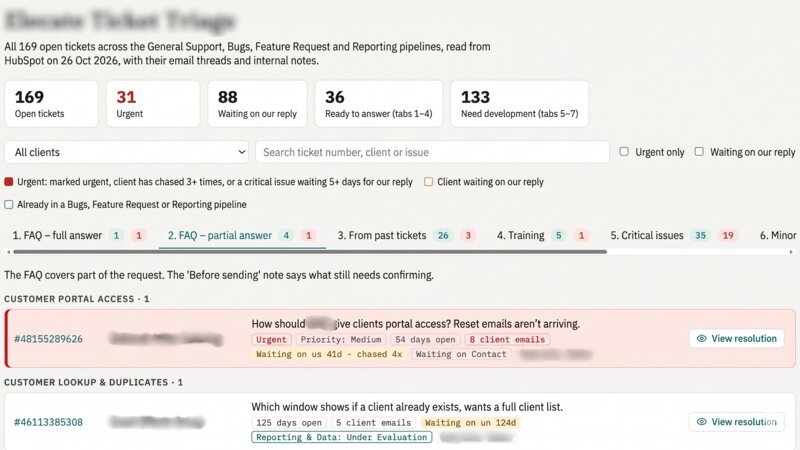
Rheal built an AI assistant on Claude, Anthropic's AI model, that connects to the client's HubSpot account. With one "refresh" instruction it reads every open ticket along with its linked emails and internal notes. It then compares each ticket against the public FAQ site and against tickets already resolved, and sorts it into one of seven categories:
- Fully answered by the FAQ
- Partly answered by the FAQ
- Answered in a past ticket
- Training
- Critical issue
- Minor issue
- Enhancement
The results are published as an interactive dashboard and as a single HTML file that can be attached to an email. Every suggested reply is a draft for the support team to check against the source before sending. Nothing is sent to customers or changed in HubSpot automatically.
Key Features of the Solution
- Seven-Way Ticket Triage: A tab for each category, with similar tickets grouped by issue and each row showing the ticket number, customer and a one-line summary.
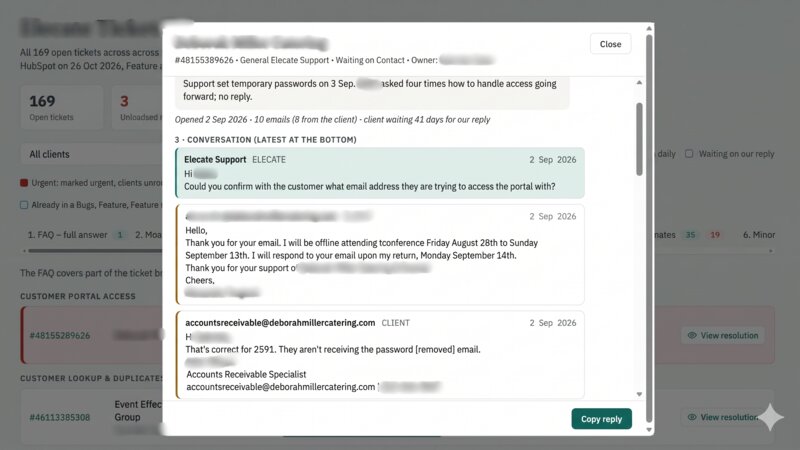
- Suggested Replies: FAQ, past-ticket and training cases include a ready-to-send reply. Each reply lists the FAQ pages or earlier tickets it is based on, so staff can check it first.
- Full Context Popup: Each ticket opens to show the reported issue, where it stands, and the email and internal-note conversation in order. It then gives the suggested reply and the checks to make before sending.
- Urgency Flags: Tickets marked urgent, chased several times or left waiting on a critical problem are highlighted in red, with the number of days waiting and chases.
- Waiting-on-Us Filter: One click shows only the tickets where the customer is waiting for the support team's reply.
- Development Priorities: Bugs are split into critical issues, minor issues and enhancements, giving the development team a ranked view of the work.
- Housekeeping Insights: Duplicate tickets from different customers are linked for merging. Tickets where the work is already finished are grouped as "Ready to close".
- Built-In Data Protection: Passwords and login details found in customer emails or notes are removed automatically before anything appears in the report.
 The Result
Rheal's solution replaced days of manual ticket reading with a single instruction. The full backlog of 169 open tickets was sorted in one pass. The solution found 31 urgent tickets and 89 where customers were waiting on a reply. It also drafted replies for 36 tickets that could be answered straight away, and listed duplicates and finished work ready to close. The support team now starts each day with a current, prioritised view of the help desk. The development team has a clear list of what to fix first. As a result, customers get faster, more consistent answers and urgent issues no longer go unnoticed.